Working with Dependencies
Dependencies in the Requirements tab allow scripts to use external files. You can add local dependencies (uploaded files) or remote dependencies (files downloaded from a URL or server path) to existing scripts or while creating a new script. Both types support archive extraction.
|
|
NOTE: The file size should not exceed 2 GB. |

Add Local Dependencies
- Navigate to Libraries > Scripting.
- Select a script you want to modify, click Edit, and click the Requirements tab.
Or
While creating a new script, go to the Requirements tab. - In the script editor, under Dependencies, browse for the file and upload it.
The file name and the file size displays automatically. - If the file is a ZIP file, select Extract Archive.
Extraction unzips the file so your script can access its contents directly.
Add Remote Dependencies
- Navigate to Libraries > Scripting.
- Select a script you want to modify, click Edit, and click the Requirements tab.
Or
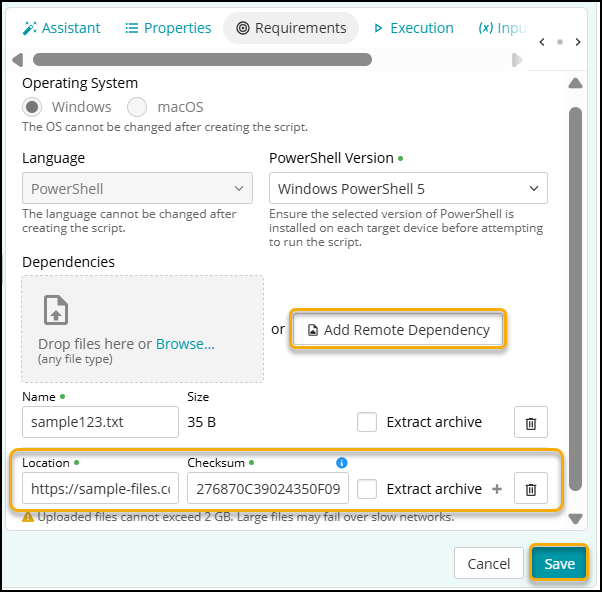
While creating a new script, go to the Requirements tab. - In the script editor, select Add Remote Dependency.
- Enter the following:
- Location: Full URL or network path of the remote file.
- Checksum: Integrity value for the file. For generating Checksum, see Generate Checksum.
-
If the file is a ZIP file, select Extract Archive.
Extraction unzips the file so your script can access its contents directly.
Points to Remember
- Use Extract Archive to unzip dependency files for script access.
- If the Checksum is incorrect, script execution fails with the error 'Incorrect checksum added’.
- If the name of the remote file is incorrect, script execution fails with the error 'Invalid location or file moved to other location'.
- If any dependency fails validation (incorrect checksum or invalid file name), the script execution fails.
Generate Checksum
- To generate the Checksum on Windows, run the following from a command prompt:
certUtil -hashfile dependency.zip SHA256
Where dependency.zip is the name of the dependency file. - To generate the Checksum on macOS, run the following from a terminal:
shasum -a 256 dependency.zip
Where dependency.zip is the name of the dependency file.